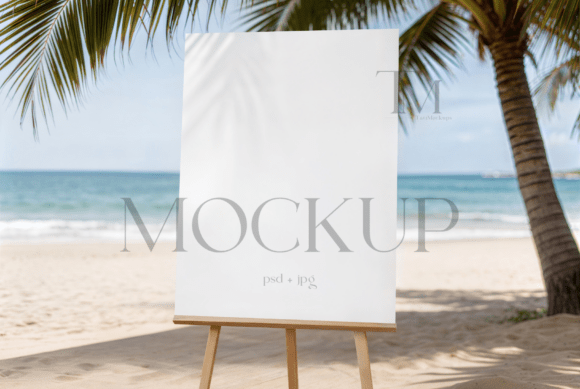
Coastal Charm: Showcase Your Designs with a Beach Welcome Sign Mockup
There is an undeniable allure to the coast—the soft texture of sand, the rhythmic sound of waves, and the golden light of a seaside sunset. Capturing this atmosphere in a design presentation can transform a simple graphic into an evocative experience. For creators of wedding signage, event posters, or tropical branding, showing a design in its intended environment is not just helpful; it is essential for conveying the right mood and setting client expectations.
More Than Just a Pretty Picture: The Anatomy of a Professional Mockup
A high-quality mockup serves as a digital stage for your work. The Beach Coastal 18x24 Welcome Sign Mockup is specifically engineered to provide a realistic, outdoor easel setup by the ocean. This is not a flat, generic background. It is a scene that tells a story. The perspective, lighting, and environmental details are designed to make your 18x24-inch design appear physically present in a breezy, coastal setting. This level of realism helps clients and audiences immediately understand how a finished product will look and feel, bridging the gap between a digital file and a tangible item.
The true power of this asset lies in its technical construction. Delivered as a PSD file, it utilizes smart object layers within Adobe Photoshop or compatible editors like Photopea. This technology allows you to seamlessly integrate your artwork. Instead of painstakingly warping or shadowing your design to fit the scene, you simply double-click the designated layer, place your graphic, and save. The mockup automatically applies the correct perspective, lighting, and texture, resulting in a flawless, professional presentation in minutes. This efficiency is invaluable for designers juggling multiple projects or small business owners managing their own branding.
Practical Applications: Where Coastal Aesthetics Shine
The utility of a well-crafted seaside mockup extends across numerous creative and commercial projects. Its primary strength is in setting a specific tone—relaxed, celebratory, elegant, or tropical. Consider these real-world uses where this mockup can elevate your work:
- Event Stationery & Signage: This is its most direct application. Showcase wedding welcome signs, bridal shower posters, anniversary party directions, or tropical event schedules. Placing your elegant script or bold typography on an easel against an ocean backdrop instantly communicates the event's theme and location to guests.
- Brand Identity & Marketing: For businesses with a coastal, nautical, or beach-lifestyle focus—think surf shops, seaside cafes, vacation rentals, or resort wear brands—this mockup becomes a powerful branding tool. Present your logo, store signage, or promotional posters in a context that reinforces your brand's core identity. It helps build visual consistency across your marketing assets.
- Social Media & Digital Content: In the crowded space of Instagram, Pinterest, or a blog, a captivating image stops the scroll. Use the mockup to create stunning visuals for announcing a new product line, promoting a beach-themed sale, or sharing inspiration. It provides a professional backdrop for quotes, announcements, or portfolio pieces, significantly boosting audience engagement.
- Portfolio & Client Presentations: For graphic designers and freelancers, presenting work in a realistic context demonstrates foresight and professionalism. It shows clients not just a flat design, but a vision of the final product in use. This can build confidence and justify design decisions, making it easier to get project approvals.
- Digital Products & Printables: If you sell printable art, invitation templates, or wall decor on platforms like Etsy, a compelling mockup is your virtual storefront. Displaying your "Beach House Rules" printable or coastal nursery art within this scene helps potential buyers visualize it in their own space, which can directly increase conversion rates.
Streamlining Your Workflow: From File to Finished Presentation
Integrating this mockup into your process is straightforward, designed to save you time and technical hassle. The package includes both the layered PSD file and a high-resolution JPG for immediate use. The step-by-step process is intentionally simple to accommodate varying levels of software proficiency.
- Open and Edit: Launch the PSD file in Photoshop. Locate the smart object layer, typically named for easy identification, and double-click it. This opens a new window where you will place your own design.
- Insert Your Design: Drag and drop your 18x24 inch graphic file into this window. Adjust the scale and position to align perfectly with the canvas dimensions of the sign.
- Save and Close: Save the changes within the smart object window (File > Save) and close it. Return to the main mockup file to see your design automatically and realistically integrated into the coastal scene.
This non-destructive workflow means you can experiment with different design variations—altering colors, fonts, or layouts—without ever damaging the original mockup file. You can generate countless presentation options from a single asset.
Choosing the Right Typography for Your Coastal Vision
While the mockup provides the scene, the typography you pair with it completes the narrative. The choice of font is critical for achieving the desired mood and ensuring readability. For a beach coastal theme, certain typographic styles naturally complement the environment.
A serif font with elegant, thin strokes can evoke a classic, romantic seaside wedding vibe. A sans serif font with clean, geometric lines might suit a modern, minimalist beach resort's branding. Script fonts or handwritten fonts are popular choices for conveying a relaxed, personal, and organic feel, perfect for bridal shower invitations or casual café menus. However, readability is paramount. Highly decorative script fonts should be used sparingly for headlines or names, paired with a simpler, highly legible sans serif for body text or event details.
When selecting your typeface, consider the overall brand identity or event theme. Is it luxurious and serene, or fun and energetic? Test your font pairing within the mockup itself. Seeing your chosen typography against the realistic background of sand and sea will immediately reveal if the combination works. Does the text stand out clearly? Does the style feel harmonious with the setting? This practical testing is far more effective than viewing fonts in isolation.
Understanding the Terms for Creative Use
This digital asset is provided for the purpose of incorporating your own designs into professional or personal projects. The original files are delivered without a watermark, ensuring your final presentations are clean and unbranded. It is important to note that the stationery designs shown in the example are for display only and are not included in your purchase.
The license permits you to modify the image, apply filters, and use the resulting mockup for your business, portfolio, or marketing materials. However, reselling the mockup file itself as a standalone product is not permitted. This ensures the asset maintains its value and is used as intended—a tool for designers and creators to present their own work more effectively.
In a visual marketplace, context is king. A design presented in a compelling, relevant environment communicates more than the artwork alone. The Beach Coastal 18x24 Welcome Sign Mockup provides that context, offering a slice of seaside charm to make your projects resonate with clarity and style. It is a practical tool for anyone looking to add a professional, atmospheric touch to their coastal-themed designs.