Instantly Elevate Your Brand with Round Envelope Sticker Mockups
Every detail in your branding toolkit tells a story, and sometimes, it's the smallest elements that make the most significant impact. A beautifully designed round sticker on a kraft envelope or a thank-you tag does more than just seal a package—it creates a moment of delight for your customer. It’s the tactile, visual confirmation that they’ve received something crafted with care. For designers, entrepreneurs, and creators, presenting these tiny brand ambassadors in a professional, realistic context is crucial. This is where a versatile mockup template becomes your most valuable asset, allowing you to visualize and perfect your designs before they ever go to print.
More Than Just a Template: A Visual Communication Tool
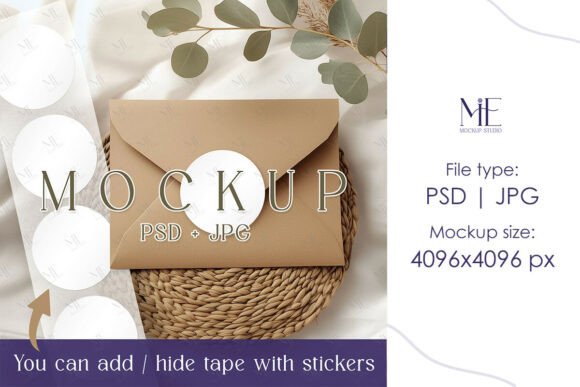
At its core, an Envelope Sticker Mockup PSD Round Tag is a digital file designed to showcase your circular graphic designs—be it a logo, a thank-you message, or a decorative element—as if they were physically printed and placed on an envelope or tag. The "PSD" signifies a Photoshop file with Smart Object layers, meaning you can simply drag and drop your artwork into a designated layer, and the mockup automatically applies realistic shadows, textures, and perspectives. This isn't just about seeing your design on a blank canvas; it's about seeing it in context. The included high-resolution JPG file offers a crisp, watermark-free alternative for quick sharing or use in programs beyond Photoshop.
The visual appeal lies in this authenticity. A flat logo file on a white background is useful, but a logo presented on a textured kraft paper sticker, with soft shadows and a slight curve, conveys quality and intention. It helps clients and customers immediately understand the scale, material, and application of your design. This level of realism bridges the gap between concept and reality, making your portfolio or product listings far more compelling.
Practical Applications Across Your Creative Workflow
The utility of a well-crafted round sticker mockup extends across numerous projects, making it a foundational piece in any designer's library of assets. Its flexibility is its greatest strength.
- Brand Identity & Logo Design: Before finalizing a logo, see how it performs as a physical sticker. Does it maintain clarity and impact at a 3x3 inch size? Does it pair well with the organic feel of kraft packaging? This mockup provides a vital real-world test.
- Packaging & Product Presentation: For small businesses selling physical goods, this is indispensable. Mock up your thank-you stickers, logo seals for boxes, or ingredient labels. It’s perfect for visualizing how your branding will look on Etsy shop packaging, subscription boxes, or artisan product jars.
- Marketing & Social Media Graphics: Create engaging, scroll-stopping content for Instagram, Pinterest, or Facebook. Showcase a new logo design or a promotional sticker in a lifestyle context that feels native to social platforms, increasing engagement and shareability.
- Wedding & Event Stationery: Designers specializing in invitations can use the envelope label mockup to present custom wax seal alternatives, monogram stickers, or thematic graphics to clients, offering a clearer vision of the final suite.
- Digital Products & Marketing Assets: If you sell digital planners, templates, or printable art, use these mockups to create stunning preview images for your shop listings. A sticker mockup can beautifully frame your design, making your digital download look like a tangible, desirable object.
- Website & Blog Visuals: Enhance your portfolio website or blog posts with professional imagery. Instead of a simple screenshot, place your web graphics or UI elements into a mockup for a more polished and contextual presentation.
Choosing the Right Style for Your Project's Voice
Not all round sticker mockups are created equal. The style you choose should align with your project's goals and brand personality. A kraft paper background evokes a handmade, eco-friendly, and rustic vibe—ideal for organic brands, bakeries, or craft businesses. A clean, white envelope background offers a modern, minimalist, and corporate feel, suited for tech startups, consultancies, or contemporary stationery.
Consider the finish as well. Does your brand call for a matte, textured feel or a glossy, reflective surface? The right mockup will feature textures and lighting that complement your design's intended aesthetic. When selecting a premium font or typeface for your sticker, the mockup helps you test readability. A script font might look beautiful large, but will it be legible at a small scale on a textured sticker? This is where you find out. Pairing your chosen creative font with the mockup's context ensures your final design is both beautiful and functional.
Streamlining Your Process with Smart Object Layers
The true power of a PSD mockup with Smart Object layers lies in its efficiency. This feature transforms a complex visual task into a simple, repeatable process. You don't need to be a Photoshop expert to achieve professional results. The process is designed for speed:
- Instant Access: After purchase, download the file immediately. No shipping, no wait.
- Simple Edit: Open the PSD, locate the clearly labeled Smart Object layer (often a .psb file), and double-click it.
- Insert Your Design: A new window opens. Paste your logo, typography, or graphic here. Adjust the size and position, then save and close the .psb file.
- Automatic Integration: Back in the main mockup file, you'll see your design seamlessly applied with all the realistic effects—shadows, lighting, and texture—already in place.
This non-destructive workflow means you can experiment endlessly. Try different color palettes, swap out typefaces, or test multiple logo variations in minutes. It’s a game-changer for creating cohesive brand presentations or client proposals, allowing you to showcase a full suite of applications—from a business card to a thank-you sticker—with consistent visual language. This consistency is key to building strong brand recognition.
Ultimately, incorporating a resource like the Envelope Sticker Mockup PSD Round Tag into your toolkit is about working smarter. It elevates the perceived value of your work, provides clarity for your audience, and saves you countless hours of manual rendering. Whether you're finalizing a brand identity system, creating a product catalog, or designing a marketing campaign, having a library of versatile, high-quality mockups ensures your ideas are always presented in their best possible light. It’s a small investment that pays dividends in professionalism and creative confidence.